-

JavaScript에서 비동기 처리를 할 때 사용되는 중요한 기능 Promise에 대해 공부했습니다.
Promise란?
MDN Document에서 Promise는 아래와 같이 설명하고 있습니다.
Promise 객체는 비동기 작업이 맞이할 미래의 완료 또는 실패와 그 결과 값을 나타냅니다. 프로미스가 생성될 때 꼭 알 수 있지는 않은 값을 위한 대리자로, 비동기 연산이 종료된 이후의 결괏값이나 실패 이유를 처리하기 위한 처리기를 연결할 수 있도록 합니다.
즉, Promise는 어떤 값이 언제 리턴될지 모르는 비동기 작업을 진행할 때 사용되는 객체로, 비동기 작업의 실패나 성공 처리를 할 수 있습니다.
Promise의 기본
Promise는 세 가지 형태를 갖습니다.
- 대기(pending): 성공 혹은 실패 여부를 아직 알 수 없는 대기 상태
- 이행(fulfilled): 오류 없이 연산 성공
- 거부(rejected): 연산 실패 (오류 발생)
pending 상태의 Promise가 fulfilled 상태가 되거나 rejected 상태가 되는 것이죠. 아래에서 자세히 언급되지만 짧게 덧붙이자면 fulfilled 상태는
then함수로, rejected 상태는catch함수로 처리할 수 있습니다.상태
new Promise
Promise의 기본적인 형태는 다음과 같습니다.
const promise = new Promise((resolve, reject) => { // action });new연산자로 새로운 Promise 객체를 만들고resolve와reject함수를 인자로 받는 함수 안에서 Promise를 fulfilled 상태로 만들거나 rejected 상태로 만들어 Promise를 종료시킵니다.
그럼 위의 코드를 조금 바꿔 3초 뒤 문자열을 리턴하는 Promise를 작성해볼까요?const promise = new Promise((resolve, reject) => { setTimeout(() => { resolve(`Hi! I'm promise! 👋`); }, 3000); }); console.log(promise); setInterval(() => { console.log(promise); }, 1000);비동기를 나타내기 위해
setTimeout함수를 사용했습니다. 그리고promise를 출력하고setInterval함수를 이용해 1초에 한 번씩promise를 출력하는 코드를 작성했습니다. 콘솔을 열어 출력된 결과를 확인해보면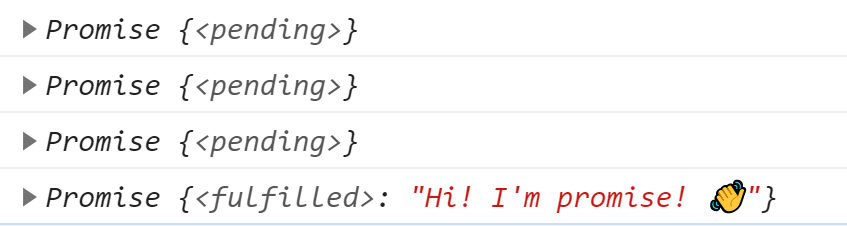
3초 뒤 fulfilled 위와 같이 pending 상태이다가 3초가 지나고 fulfilled 상태가 되며
resolve함수에 전달한 문자열Hi! I'm promise! 👋가 Promise에 담기는 것을 볼 수 있습니다.그럼 우리는 언제 종료될지 모르는 Promise를 매번
setInterval로 검사해가며 사용해야할까요? 🙅♀️ 노노 그럴 리가 없죠. Promise가 resolve 되거나 reject 되는 상태에 실행할 수 있는 메서드가 있습니다.then()
.then()메서드는 Promise가 resolve 되었을 때, 즉 fulfilled 상태가 되었을 때 실행되는 메서드입니다.resolve에서 전달한 값을 인자로 받는 callback 함수를 실행합니다. 코드로 볼까요?promise.then(res => console.log(res));위 코드에서
res는 문자열Hi! I'm promise! 👋이기 때문에 콘솔 창을 열어 확인해보면 아래와 같이 문자열이 그대로 출력되는 것을 확인할 수 있습니다.
catch()
Promise의 상태가 fulfilled가 되는 경우는
then메서드에서 처리할 수 있습니다. 하지만 rejected 상태가 되는 경우에도then에서 처리할 수 있을까요?reject함수를 사용해 Promise의 상태를 rejected로 만들어보겠습니다.const promiseErr = new Promise((resolve, reject) => { setTimeout(() => { reject(`Sorry! I'm error! 🙏`); }, 2000); }); promiseErr.then(res => console.log(res));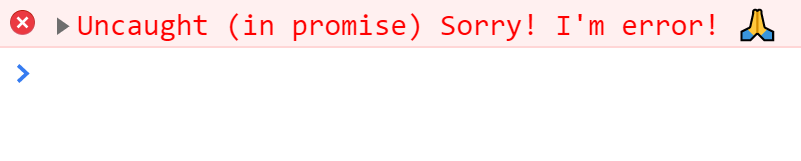
이런,
console.log(res)문장이 실행되지 않고 error가 발생해버립니다.then()함수에서 처리할 수 없다는 뜻이죠. 이렇게 rejected 상태가 될 때 우리는then대신catch메서드를 사용할 수 있습니다.promiseErr .then(res => console.log(res)) .catch(err => console.error(err));위와 같이
catch문을 써서 인자로 전달된err을console.error로 출력해보면 이렇게 콘솔 창에 출력되게 됩니다.
catch가 잡을 수 있는 것은 이게 다가 아닙니다.then을 실행하던 중 발생하는 오류들도catch하나만 작성하면 모두 처리할 수 있습니다.then에서 오류를 발생해볼까요?promise .then(res => console.log(unknown)) .catch(err => console.error(`Oops! ${err}`));
결과를 통해
then에서 발생한 오류 (위의 예제 코드에서는 is not defined) 오류도catch문장에서 처리하고 있음을 알 수 있습니다.finally
finally는 Promise가 resolve 되든 reject 되든 상태에 관계없이 무조건 실행되는 메서드입니다.try-catch문의finally처럼요.promise.then(res => console.log(res)) .catch(err => console.error(err)) .finally(() => console.log('TA-DA 🥳'));위 코드를 실행시키면 다음과 같이
then처리 후finally처리가 이뤄집니다.
Promise.all()
스크립트로 비동기 처리를 하다 보면 여러 개의 비동기 작업을 실행하게 될 때가 있습니다. 모든 Promise의 작업이 끝난 후 모든 Promise의 resolve 된 값이 필요한 경우엔 어떻게 해야 할까요? resolve 안에서 또 Promise를 호출하고 그 Promise의 resolve 안에서 또 Promise를 호출하고... 이런 방식으로 사용하지 않습니다. 우리에게는
Promise.all이 있으니까요.MDN Document에서는
Promise.all을 이렇게 설명하고 있습니다.순회 가능한 객체에 주어진 모든 프로미스가 이행한 후, 혹은 프로미스가 주어지지 않았을 때 이행하는 Promise를 반환합니다.
쉽게 말하자면,
Promise.all에 전달한 모든 Promise가 끝나면 그 Promise들의 resolve 된 결과를 한꺼번에 돌려주는 메서드입니다.Promise.all() 사용하기
역시 코드와 결과로 보는 게 가장 이해가 쉽죠. 세 개의 Promise들을 만들어봅시다.
const firstPromise = new Promise((resolve, reject) => { setTimeout(() => { resolve('1️⃣ First Promise'); }, 1000); }); const secondPromise = new Promise((resolve, reject) => { setTimeout(() => { resolve('2️⃣ Second Promise'); }, 5000); }); const thirdPromise = new Promise((resolve, reject) => { setTimeout(() => { resolve('3️⃣ Third Promise'); }, 3000); });setTimeout의 interval 값을 살펴보면 시간 순으로firstPromise,thirdPromise그리고 마지막으로secondPromise가 resolve 됩니다.이 세 Promise를
Promise.all에 전달해봅시다.const allPromise = Promise.all([firstPromise, secondPromise, thirdPromise]); allPromise.then(res => console.log(res)); // 아래도 같은 코드입니다 Promise.all([firstPromise, secondPromise, thirdPromise]) .then(res => console.log(res));다음과 같은 결과가 리턴됩니다. Promise 세 개가 각각 끝나는 타이밍에 관계없이 전달한 Promise의 순서대로 순환 가능한 iterable 객체에 resolve 된 결괏값을 담아 리턴합니다.

만약
Promise.all에[secondPromise, firstPromise, thirdPromise]순서대로 전달하면
2️⃣ Second Promise가 index 0에 담기게 됩니다.Promise.all의 오류
만약,
Promise.all에서 오류가 발생하거나 reject가 발생면 어떻게 될까요?const firstPromiseErr = new Promise((resolve, reject) => { setTimeout(() => { reject(`1️⃣ First Promise Error`); }, 5000); }); const allPromiseErr = Promise.all([firstPromiseErr, secondPromise, thirdPromise]); allPromiseErr.then(res => console.log(res)) .catch(err => console.error(err));reject를 시키는
firstPromiseErr를 생성하고Promise.all에 전달해보았습니다. 결과를 확인해보면
reject 된 결과만 출력되게 됩니다.
firstPromiseErr의 작업 시간이 1초이든 5초이든 reject 되었기 때문에 다른 Promise들도 모두 종료됩니다. 또한, 위에서 보았던then에서 발생한 오류도catch에서 처리되고 Promise들의 작업이 마찬가지로 모두 종료됩니다.allPromise.then(res => console.log(unknown)) .catch(err => console.error(err));
Promise.race()
이번에도 MDN Document에서 설명하는
Promise.race의 정의를 먼저 살펴봅시다.Promise 객체를 반환합니다. 이 프로미스 객체는 iterable 안에 있는 프로미스 중에 가장 먼저 완료된 것의 결괏값으로 그대로 이행하거나 거부합니다.
가장 먼저 완료된 것이라는 설명이 보이시나요?
Promise.race도Promise.all과 같이 여러 개의 Promise들에 대한 작업을 실행합니다. 하지만Promise.all과 가장 큰 차이점은Promise.all은 모든 Promise들이 끝날 때까지 기다리지만Promise.race는 경주(race)처럼 제일 먼저 끝나는 Promise에 대한 결과를 리턴한다는 것입니다. 그래서Promise.race의 리턴 값은 iterable 객체도 아니죠.Promise.race() 사용하기
const racePromise = Promise.race([firstPromise, secondPromise, thirdPromise]);
racePromise.then(res => console.log(res));
Promise.race의 오류
Promise.race의 reject나 오류 처리도 모두catch메서드에서 다른 예제들과 같아 처리됩니다.Promise and Fetch
API를 호출할 때
fetch라는 함수를 사용해보거나 본 적이 있으실 겁니다.fetch함수의 선언부를 살펴보면 다음과 같이 되어있습니다.declare function fetch(input: RequestInfo, init?: RequestInit): Promise<Response>;타입스크립트 코드인데 뒤에
: Promise<Response>라는 부분이 보이시나요?fetch의 리턴 타입이 Promise라는 뜻입니다. 즉,fetch를 호출하면 우리는 앞에서 계속 보아온 Promise 객체를 리턴 받는다는 뜻이죠. JSONPlaceholder에서 제공해주는 URL로fetch코드를 작성해봅시다.fetch('https://jsonplaceholder.typicode.com/users') .then(res => console.log(res.json()));콘솔 창에는 어떤 결과가 출력될까요?
json메서드를 호출했으니 response를 JSON 타입으로 변환한 데이터가 들어있어야 하지 않을까요? 하지만 기대와는 달리 pending 상태의 Promise 객체가 출력됩니다.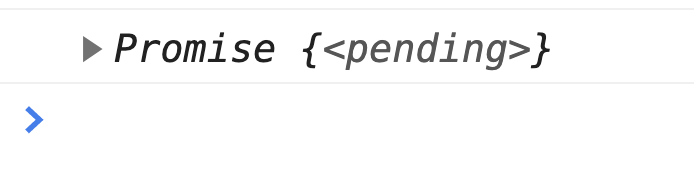
json함수도promise의body텍스트를 JSON으로 바꾸는 결과로 resolve 되는 Promise 객체를 반환하기 때문입니다. (참고 : MDN Document - Body.json())interface Body { readonly body: ReadableStream<Uint8Array> | null; readonly bodyUsed: boolean; arrayBuffer(): Promise<ArrayBuffer>; blob(): Promise<Blob>; formData(): Promise<FormData>; json(): Promise<any>; // <- Promise 타입이죠! text(): Promise<string>; }따라서
res.json()을 리턴 받는then을 한 번 더 작성해줘야 우리가 원하는 데이터를 얻을 수 있습니다.fetch('https://jsonplaceholder.typicode.com/users') .then(res => res.json()) .then(resJson => console.log(resJson));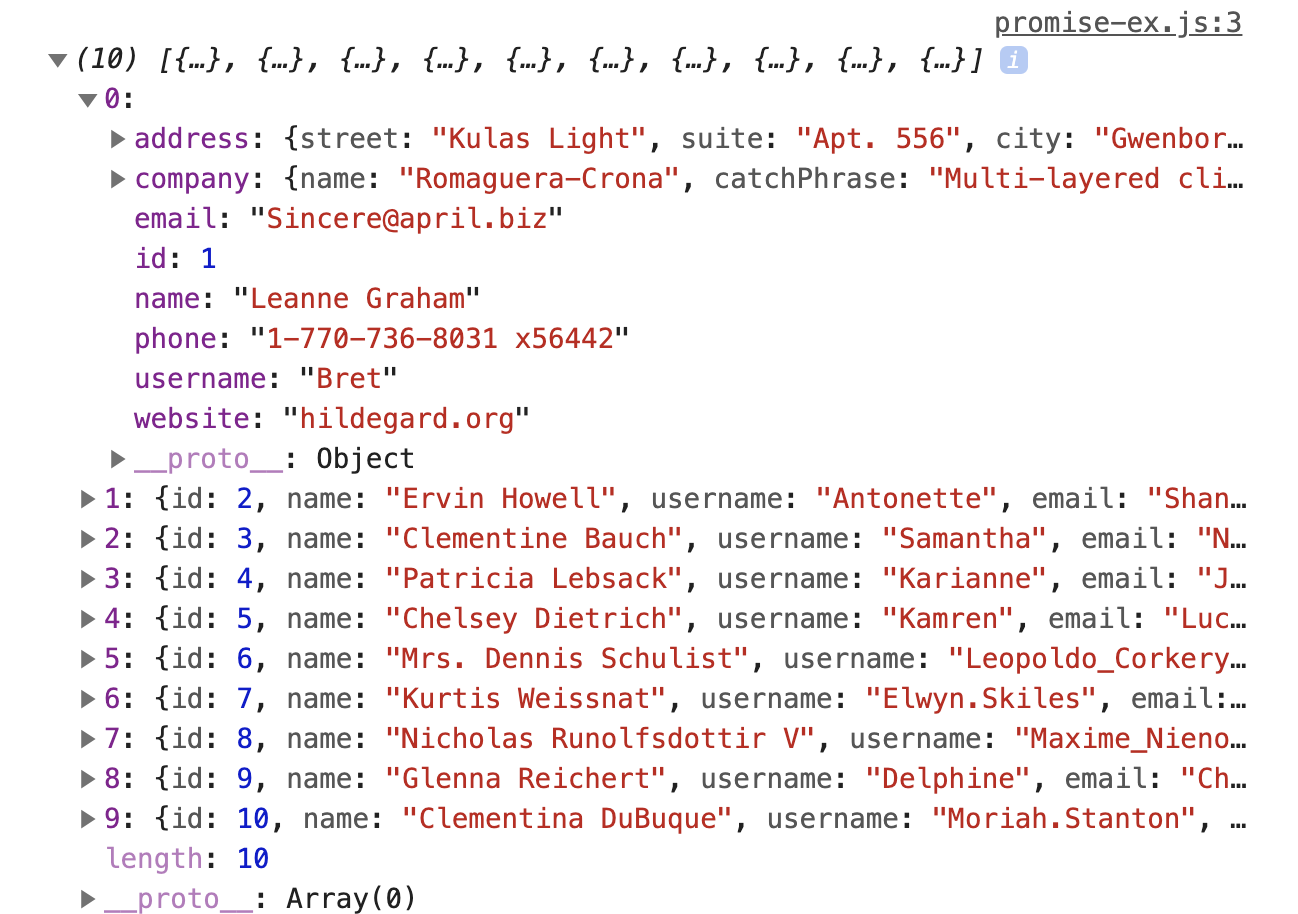
JSON 형태로 변환하는
json메서드처럼 텍스트 형태로 변환하는text메서드도 동일하게 Promise 객체를 리턴하기 때문에then메서드를 한 번 더 사용해줘야 합니다.fetch('http://127.0.0.1:5500/promise-example.html') .then(res => res.text()) .then(resText => console.log(resText));
비동기를 구현하기 위한 첫걸음인 Promise를
드디어정리해보았습니다. Promise와 관련된 더 많은 메서드는 다른 포스트에서 다뤄볼까 합니다. 오류나 오타 수정 등의 댓글은 언제나 감사합니다!'TIL > ES6+' 카테고리의 다른 글
Async/Await (0) 2021.02.07 Default Value & Destructuring (0) 2021.01.02 Array Function2 (0) 2020.12.10 Array Function (0) 2020.12.07 For Loop (0) 2020.12.05